Bitbucket Webhook Receiver
The Bitbucket webhook receiver responds to repo:push and
pullrequest:fulfilled events originating from Bitbucket Cloud repositories,
and repo:refs_changed and pr:merged events originating from Bitbucket
Server and Data Center repositories.
The receiver responds to repo:push and repo:refs_changed events by
refreshing all Warehouse resources subscribed to those repositories.
The receiver responds to pullrequest:fulfilled (Bitbucket Cloud) and
pr:merged (Bitbucket Server/Data Center) events by refreshing all running
Promotion resources that are waiting on the merged pull request via a
git-wait-for-pr step. This
enables near-instant detection of PR merges instead of relying on the default
polling interval.
"Refreshing" a Warehouse resource means enqueuing it for immediate
reconciliation by the Kargo controller, which will execute the discovery of new
artifacts from all repositories to which that Warehouse subscribes.
"Refreshing" a Promotion resource means enqueuing it for immediate
reconciliation. The
git-wait-for-pr step will then
call the Git provider's API to detect whether the PR has been merged or closed,
and proceed accordingly.
The Bitbucket webhook receiver also works with Bitbucket Server and Bitbucket Data Center, although some URLs in this document may need to be adjusted accordingly.
Configuring the Receiver
A Bitbucket webhook receiver must reference a Kubernetes Secret resource with
a secret key in its data map. This
shared secret will be used by
Bitbucket to sign requests and by the receiver to verify those signatures.
The following commands are suggested for generating and base64-encoding a complex secret:
secret=$(openssl rand -base64 48 | tr -d '=+/' | head -c 32)
echo "Secret: $secret"
echo "Encoded secret: $(echo -n $secret | base64)"
apiVersion: v1
kind: Secret
metadata:
  name: bb-wh-secret
  namespace: kargo-demo
  labels:
    kargo.akuity.io/cred-type: generic
data:
  secret: <base64-encoded secret>
---
apiVersion: kargo.akuity.io/v1alpha1
kind: ProjectConfig
metadata:
  name: kargo-demo
  namespace: kargo-demo
spec:
  webhookReceivers:
  - name: bb-wh-receiver
    bitbucket:
      secretRef:
        name: bb-wh-secret
Retrieving the Receiver's URL
Kargo will generate a hard-to-guess URL from the receiver's configuration. This URL can be obtained using a command such as the following:
kubectl get projectconfigs kargo-demo \
  -n kargo-demo \
  -o=jsonpath='{.status.webhookReceivers}'
Registering with Bitbucket
To configure a single Bitbucket repository to notify a receiver of relevant events:
-
Navigate to
https://bitbucket.org/<workspace>/<repository>/admin/webhookswhere<workspace>has been replaced with a Bitbucket workspace and<repository>has been replaced with the name of a repository belonging to that workspace and for which you are an administrator. -
Click Add webhook.
-
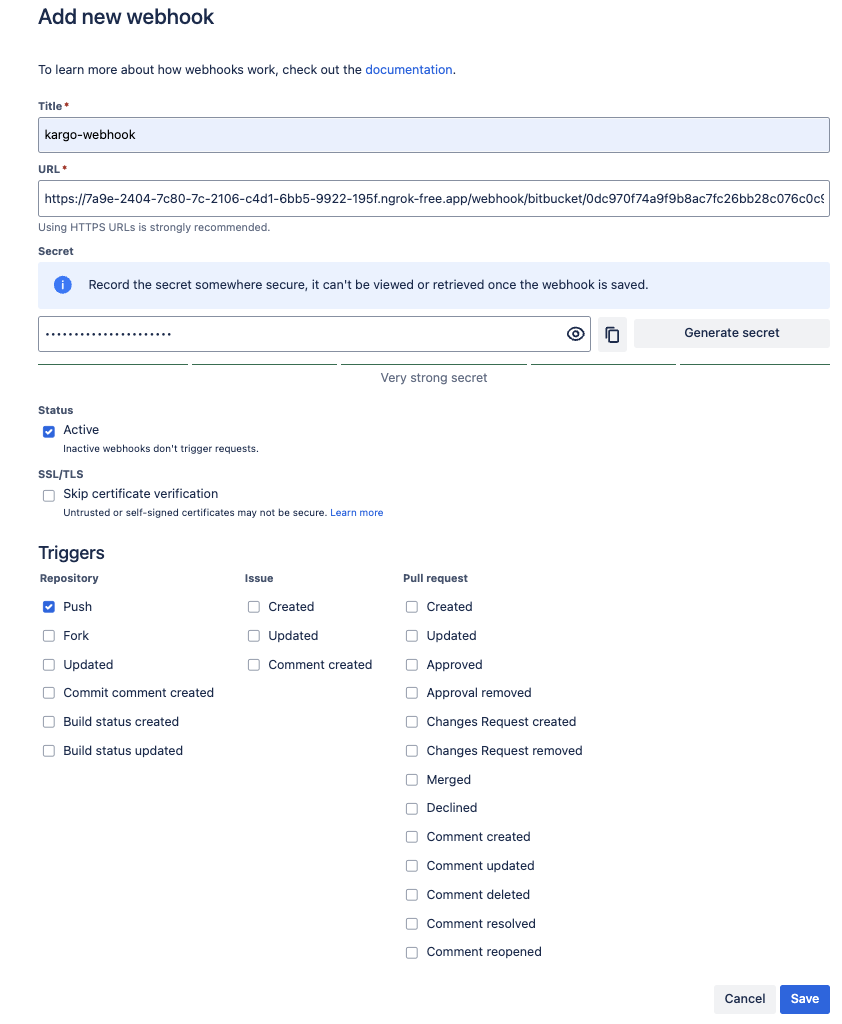
Complete the Add new webhook form:
-
Enter a descriptive name in the Title field.
-
Complete the URL field using the URL for the webhook receiver.
-
Complete the Secret field using the (unencoded) value assigned to the
secretkey of theSecretresource referenced by the webhook receiver's configuration.dangerDo not use the Generate secret button in the Bitbucket UI.
Kargo incorporates the secret's value into the URL it generates for the webhook receiver. Using a secret in this field other than the one already referenced by the receiver's configuration will require revisiting that configuration and doing so will change the receiver's URL.
-
Under Status, ensure Active is selected.
-
Under Triggers → Repository, ensure Push is selected.
If you use PR-based promotion workflows (i.e. promotions that include a
git-wait-for-prstep), also select Merged under Triggers → Pull Request. This enables Kargo to detect PR merges near-instantly instead of relying on the default polling interval. -
Click Save.
-
-
Verify that the new webhook appears under Repository hooks.
-
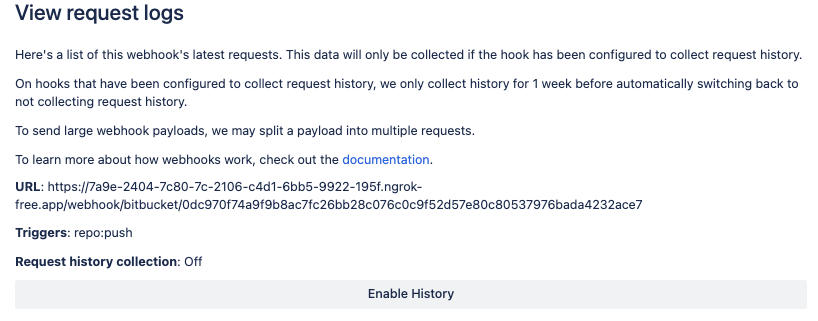
If you'd like to record outbound webhook requests for troubleshooting purposes:
-
Click the View requests link next to your webhook.
-
Click on Enable History.
-
When these steps are complete, the repository will send events to the webhook receiver.
For additional information on configuring webhooks, refer directly to the Bitbucket Docs.